


The short version
- What it is: SMS automation sends texts from triggers, schedules and replies instead of by hand: follow-ups, reminders, drip sequences and keyword auto-replies.
- Who it affects: teams that text many leads or customers, such as brokers, lenders, call centers, agencies and clinics.
- What to do: start with one goal and one trigger, check opt-outs at send time, keep quiet hours and hand unclear replies to a person.
- When: before you scale volume. Every new workflow is another place a text can reach someone who opted out.
SMS automation means texts are sent by rules instead of by hand: a trigger (a form, a booking, a reply), an audience, a message and a timing. Businesses use it for lead follow-up, appointment reminders, drip sequences and keyword auto-replies. Done well, it saves staff time and keeps response times short without texting people who opted out.
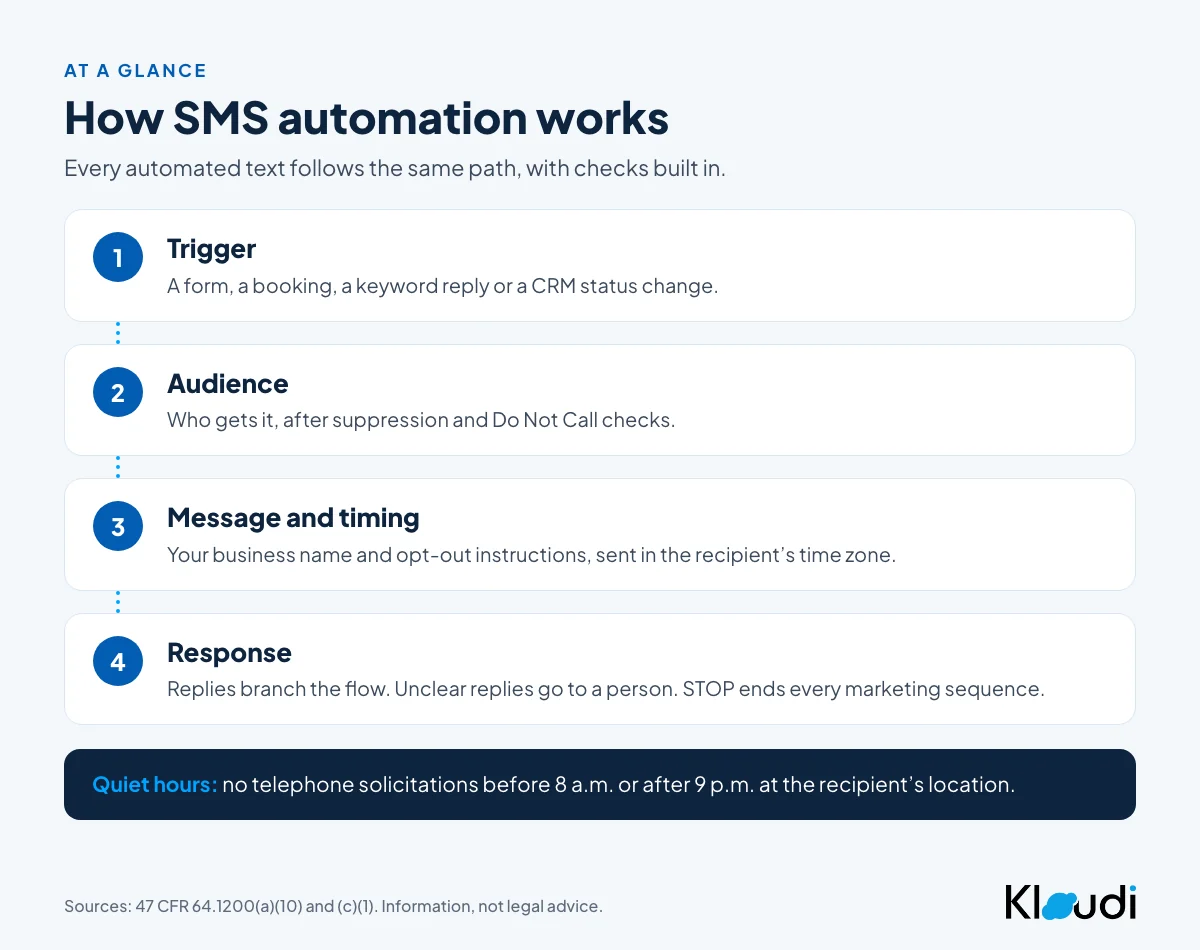
How does SMS automation work?
Every automated text follows the same sequence:
Trigger → audience → message → timing → send → response
- Trigger: what starts the workflow, such as a form submission, a booked appointment, a keyword reply or a status change in your CRM.
- Audience: who gets the message, after suppression and DNC checks.
- Message: the text, with your business name and opt-out instructions.
- Timing: right away, after a delay, or on a schedule in the recipient’s time zone.
- Response: what happens next, depending on whether and how the person replies.
Example: lead submits a form → welcome text → follow-up scheduled for the next day → lead replies YES → qualification sequence starts → a rep takes over.
How do you send automated text messages?
Start small. One goal, one trigger, one sequence.
- Pick the goal. Faster lead response, fewer missed appointments, or re-engaging old leads.
- Pick the trigger. “New lead in CRM” or “appointment booked” are the most common.
- Write the message. Short, clear about who you are and why they are getting it, with opt-out instructions.
- Set the timing. Send in the recipient’s time zone and keep quiet hours.
- Add branches. People who reply need a different next step from people who don’t.
- Test it. Check triggers, links, timing and that STOP actually stops the sequence.
- Watch the results. Delivery, replies and opt-outs tell you if the workflow is working.
How do automated text message reminders work?
Reminders are the simplest and most useful automation. A booking or a due date triggers a message at a set time before the event: a confirmation when the appointment is booked, a reminder the day before, and a short one an hour before. Replies like “C” to confirm or “R” to reschedule can route to the right next step.
Appointment reminders and other informational texts are treated differently from marketing texts under the FCC’s rules, but they still need the right consent and a working opt-out. Keep reminder workflows separate from promotional ones so an offer never rides on a reminder.
What is drip SMS and when should you use it?
A drip sequence is a series of texts sent over days or weeks: a follow-up on day 1, a check-in on day 3, a last touch on day 7. It works for lead nurturing and re-engagement. Two rules keep it clean:
- Stop on reply. A person who answered should leave the drip and go to a person or a different flow.
- Stop on opt-out, everywhere. An opt-out from one sequence should end every marketing sequence for that number.
What can an AI SMS chatbot do?
An AI SMS chatbot, or AI reply tool, answers common questions by text, qualifies leads and books appointments without a person typing each reply. It works best on predictable questions (hours, pricing ranges, next steps) with a clear handoff to a person.
What we would set up first:
- A handoff rule. Anything unclear, upset or legal goes to a person.
- Opt-out recognition. “Stop,” “please don’t text me” and similar requests end messaging. Under 47 CFR 64.1200(a)(10), any reasonable request to stop counts, not only the keyword.
- Review of AI drafts. AI tools speed up writing, but a person should approve templates before they go into a live sequence.
How should you measure automated text campaigns?
Review the numbers each workflow produces: delivery rate, reply rate, opt-out rate and the outcome you care about (booked calls, kept appointments). A rising opt-out rate is the earliest sign a sequence is too frequent or off-target. Delivery problems usually point to list quality or registration; our guide to SMS delivery issues covers the causes. To read what the replies themselves are telling you, see our explainer on how AI can analyze text messages.
SMS automation vs manual texting
| Manual texting | SMS automation |
|---|---|
| Each text sent by a person | Texts sent by triggers and schedules |
| Follow-ups depend on someone remembering | Follow-ups follow set rules |
| Hard to scale past a few hundred contacts | Scales with volume |
| Easy to miss a lead or a reminder | Consistent timing |
Automation does not replace people. It handles the repeat touches so your team can spend time on the conversations that need judgment.
How do you keep SMS automation compliant?
These are all sender-side controls:
- Consent first. Marketing texts sent with an autodialer need prior express written consent (47 CFR 64.1200(a)(2)). Keep a record of when, where and how each person agreed.
- Check suppression at send time, not only when the list was built.
- Keep quiet hours. No telephone solicitations before 8 a.m. or after 9 p.m. at the recipient’s location (47 CFR 64.1200(c)(1)).
- Honor opt-outs within 10 business days from every channel (47 CFR 64.1200(a)(10)). See our guide to revocation of consent under the TCPA.
- Register your 10DLC campaign for each use case before you send.
The full list is in our TCPA compliance checklist for text messages.
How does Kloudi support SMS automation?
Kloudi Text Automations support multi-step drip sequences, time-based intervals, conditional flows and trigger-based auto-replies on keywords such as STOP, YES, INFO or CALL. AI Compose helps teams draft templates, which they review before deployment, and conversation texting keeps two-way replies in a team inbox. To trigger texts from your own systems, see our guide to connecting an SMS API to your CRM.
What to check with your counsel
- Which of your automated messages are marketing and which are informational, and what consent does each need?
- Does an opt-out from one sequence stop every marketing sequence and every tool?
- Do any state laws limit how many texts you can send a person in a day?
Frequently asked questions
How can I automate SMS messages?
Use an SMS automation tool to set a trigger (like a form submission or booking), the audience, the message and the timing. The tool sends the text when the trigger fires and can branch on replies.
Can you set up an automated response to text messages?
Yes. Keyword auto-replies and AI reply tools can answer incoming texts. Route anything unclear to a person, and treat any clear request to stop as an opt-out.
What are automated text messages used for?
Lead follow-up, appointment confirmations and reminders, onboarding, account notifications, promotions to opted-in contacts and re-engagement.
Are automated text messages legal?
Yes, with the right consent, a working opt-out honored within 10 business days, quiet hours and Do Not Call checks for marketing texts. The rules depend on the message type.
This guide is general information, not legal advice. Talk to your own counsel about how these rules apply to your business.
Sources
- 47 CFR 64.1200 (current text, eCFR): https://www.ecfr.gov/current/title-47/chapter-I/subchapter-B/part-64/subpart-L/section-64.1200
- 47 U.S.C. 227 (Telephone Consumer Protection Act): https://www.law.cornell.edu/uscode/text/47/227
- CTIA, Messaging Principles and Best Practices (May 2023): https://api.ctia.org/wp-content/uploads/2023/05/230523-CTIA-Messaging-Principles-and-Best-Practices-FINAL.pdf